Migrating from DSE to Astra DB: Lessons Learned
Migrating from DSE to Astra DB: Lessons Learned
When we set out to migrate our trading platform from on-premise DSE clusters to DataStax Astra DB on Azure, we knew it would be a complex undertaking. The platform serves real-time financial transactions across multiple data centres with strict latency and consistency requirements. Here's how we designed and executed a zero-downtime migration.
The Challenge
Our on-premise DSE clusters were approaching end-of-life, tightly coupled with Solr-based search indexes and legacy Spark jobs. The migration needed to be:
- Zero-downtime - the platform serves real-time financial transactions
- Data-consistent - financial data cannot tolerate inconsistency
- Reversible - we needed a rollback plan at every stage
- Secure - PrivateLink, TLS, SSO, and BYOK encryption from day one
Architecture: Zero Downtime Migration Proxy
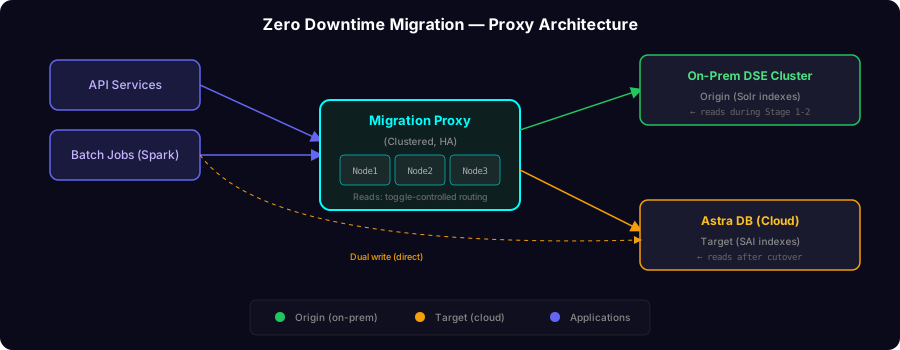
The centrepiece of our approach was a transparent proxy layer between applications and the database clusters, enabling seamless traffic routing without application changes.
Clustered Proxy for High Availability
We deployed the proxy in a clustered configuration per data centre. Each API service connected to multiple proxy instances, providing high availability. The proxy uses topology-aware configuration so the application driver receives consistent cluster information regardless of which instance it connects to.
# Proxy cluster topology (conceptual)
PROXY_CLUSTER_ADDRESSES: [node1, node2, node3]
PROXY_NODE_INDEX: Driver sees consistent topology:
system.local  → current proxy
system.peers  → all other proxies
Feature Toggle Strategy
We designed a comprehensive toggle system to control every aspect of the migration independently:
| Category | Purpose |
|---|---|
| Connection routing | Switch between on-prem and cloud connection details |
| Credential selection | Control which credentials the proxy uses for the target |
| Read routing | Direct reads to origin (on-prem) or target (cloud) |
| Query syntax | Switch between legacy search and cloud-native query syntax |
| Dual writes | Enable parallel writes to both clusters from batch jobs |
| Reconciliation | Enable data validation against the cloud target |
Phased Cutover Plan
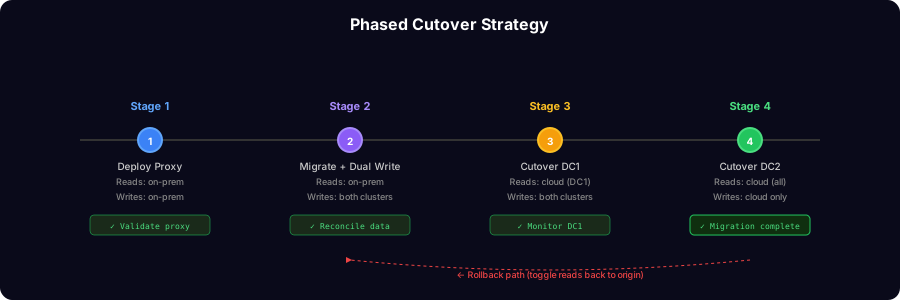
We executed the migration in four carefully orchestrated stages:
Stage 1 - Deploy proxy layer with target pointing to on-prem. All reads from on-prem. Validates the proxy works transparently with zero application impact.
Stage 2 - Migrate historical data to cloud. Enable dual writes. Reads still from on-prem. Reconciliation jobs validate data consistency between clusters.
Stage 3 - Cutover reads to cloud on the first data centre only. Enable cloud-native queries. Monitor for issues before proceeding.
Stage 4 - Cutover reads to cloud on the second data centre. Full migration complete.
Each stage had a documented fallback procedure that could restore service within the RTO window by toggling reads back to origin.
Replacing Solr with Storage-Attached Indexing
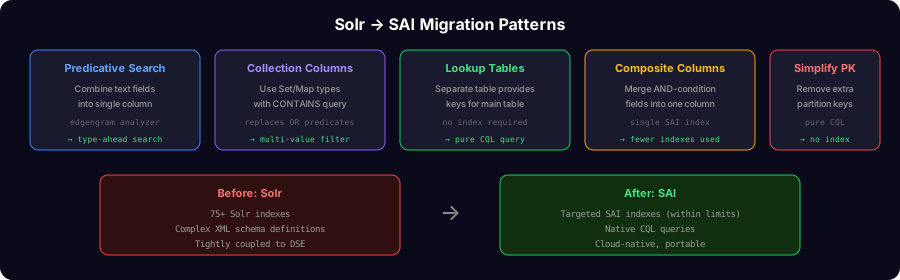
One of the biggest technical challenges was replacing 75+ Solr indexes with Storage-Attached Indexing (SAI), given cloud guardrails on index counts per database.
Our remediation patterns included:
- Predicative search columns - combining multiple text fields into a single column with an edgengram analyzer for type-ahead search
- Collection columns - using
CONTAINSqueries on sets/maps instead of OR predicates - Lookup tables - providing keys to filter on existing tables without requiring indexes
- Composite columns - combining fields always used together into a single indexed column
- Schema simplification - removing unnecessary partition key columns to enable pure CQL queries
Dual Write Framework for Batch Jobs
Rather than routing batch jobs through the proxy (which would require reading from the cloud schema), we implemented dual writes directly in the processing layer:
// Dual write pattern (pseudo-code)
function processAndWrite(dataFrame, table):
    dataFrame.writeTo(onPremCluster, table)    if featureToggle("dual_write_enabled"):
        dataFrame.writeTo(cloudCluster, table)
This kept reads and joins on the existing on-prem cluster (avoiding schema differences) while ensuring the cloud target stayed in sync.
Security Architecture
The solution implemented enterprise-grade security controls:
- Private connectivity - all traffic between on-prem and cloud via private endpoints, no public internet exposure
- Customer-managed encryption - bring-your-own-key (BYOK) for data at rest
- Enterprise SSO - console access via corporate identity provider
- Privileged access - database access restricted to designated nodes via privileged access management
- SIEM integration - audit logging enabled for compliance and monitoring
Data Reconciliation
We built automated reconciliation to continuously validate data consistency between clusters. A nightly job compared records across all migrated tables, with results logged for audit and alerting on any discrepancies.
// Reconciliation (pseudo-code)
function reconcile(table):
    onPremData = readAll(onPremCluster, table)
    cloudData  = readAll(cloudCluster, table)
    diff = compare(onPremData, cloudData)    if diff.hasDiscrepancies():
        alert(diff.summary())
        log(diff.details())
Key Takeaways
- Proxy layer is essential - it de-risks migration by enabling toggle-based routing with no application redeployment
- Feature toggles at every layer - independent control of APIs, batch jobs, and query behaviour enables granular rollback
- Phased DC-by-DC cutover - validate in one data centre before rolling to the next
- Plan index strategy early - cloud platforms have guardrails on index counts that require upfront schema redesign
- Dual writes over proxy for batch - when schemas differ, direct dual writes are simpler than routing through the proxy
- Security first - private connectivity, BYOK, and SSO from day one, not bolted on later
Result
The migration completed on schedule with zero downtime, achieving a 40% reduction in TCO and earning recognition through the 2024 Westpac Technology Award for leadership impact in delivering the platform modernisation.